Access sports betting on KPL matches, Premier League fixtures, and 800+ casino games through native applications optimized for Kenyan mobile networks. The Betway Kenya app reduces data consumption by 40% compared to browser betting while providing M-Pesa integration, live streaming, and biometric login—install the Android APK or iOS version within 3 minutes and start wagering from Nairobi, Mombasa, or Kisumu.
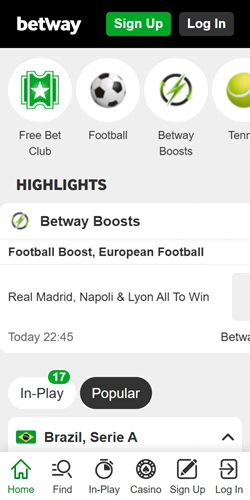
The mobile application delivers identical functionality to desktop platforms while consuming less bandwidth on Safaricom, Airtel, and Telkom networks. Android version requires OS 4.1 or later with minimum 50MB storage space, while iOS demands version 11.0 or above with 65MB available. Both applications process M-Pesa deposits within 2-5 minutes and support withdrawals through the same interface without toggling between platforms.
| Android Requirements | OS 4.1+, 50MB storage, 2GB RAM recommended |
| iOS Requirements | iOS 11.0+, 65MB storage, iPhone 6 or newer |
| App Size | 48MB (Android APK), 62MB (iOS) |
| Data Consumption | 40% less than mobile browser betting |
| Payment Integration | M-Pesa, Airtel Money, Cards, Bank transfers |
| Sports Markets | 35+ sports with live betting and cashout |
| Casino Games | 800+ slots, live dealer, crash games |
| Security Features | Biometric login, SSL encryption, 2FA |
| Live Streaming | Selected EPL and Championship matches |
| Push Notifications | Score updates, promotions, bet confirmations |
Push notifications alert users to promotional offers, match score updates, and deposit confirmations without opening the application. Live streaming operates for selected Premier League and Championship fixtures, though bandwidth requirements increase to approximately 2-3MB per minute of video content. The app maintains betting history, transaction records, and account settings synchronized across all devices where you login.
Android installation requires downloading the APK file directly from the Betway Kenya website since Google Play Store doesn't list the application due to gambling policy restrictions. The process demands adjusting security settings to permit installations from sources outside the official store—a standard procedure for betting apps in Kenya that typically completes within 5-7 minutes including download time on 4G connections.
Navigate to Settings > Security on your Android device and toggle "Unknown Sources" or "Install from Unknown Sources" to the enabled position. Some newer Android versions require per-app permission granted during installation.
Open your mobile browser and visit the Betway Kenya homepage. Scroll to the bottom where you'll find the Android download button displayed with the green Android logo.
Punch the Android download button to initiate the APK file download. The 48MB file typically downloads within 2-4 minutes on 4G networks or 5-8 minutes on 3G connections across Kenyan carriers.
Once download completes, open your device's download folder or pull down the notification shade and tap the completed download notification to access the APK file.
Tap the APK file and confirm installation when prompted. Android may request permission to install; select "Allow" or "Install Anyway" depending on your OS version.
After installation finishes, locate the Betway icon on your home screen or app drawer. Open the application and sign in using your existing credentials or complete registration for new accounts.
iOS users access the application through Apple's App Store where Betway maintains an official listing. Installation follows standard App Store procedures without requiring security setting modifications. The app supports iPhone models from iPhone 6 onwards plus all iPad versions running iOS 11.0 or later, with optimized interfaces for different screen sizes from iPhone SE to iPad Pro.
Search "Betway Sports Betting" in the App Store or navigate directly through the link provided on the Betway Kenya website. Punch the "Get" button and authenticate using Face ID, Touch ID, or your Apple ID password—download initiates immediately and completes within 3-5 minutes on Wi-Fi or 5-8 minutes on cellular data. The app appears on your home screen automatically once installation concludes; no additional configuration required before first launch.
Optimized code reduces page load duration by 60% compared to mobile browsers, with instant navigation between sports markets and casino sections.
Deposit and withdraw without leaving the app interface. M-Pesa transactions process within 2-5 minutes for deposits and 30-60 minutes for withdrawals under 10,000 KES.
Receive instant alerts for match results, promotional offers, deposit confirmations, and cashout opportunities during live betting sessions.
Access all 800+ casino games including Pragmatic Play slots, Evolution live dealer tables, and Spribe crash games like Aviator directly from mobile.
Login using fingerprint or face recognition on supported devices, eliminating password entry while maintaining account security standards.
Real-time odds updates for in-play wagering on KPL, EPL, and international matches with one-tap bet placement and instant cashout buttons.
Data consumption measurements show the application uses approximately 40% less bandwidth compared to mobile browser betting across identical sessions. A typical hour of mixed sports betting and casino gameplay consumes 15-20MB through the app versus 25-35MB via Safari or Chrome browsers on Kenyan networks. This reduction particularly benefits users on limited data bundles or in areas with inconsistent 3G coverage around Kisumu, Nakuru, or Eldoret.
Push notifications deliver promotional offers and score updates without requiring the app to remain open—background processing monitors your active bets and alerts you to significant odds changes or cashout opportunities. Biometric authentication reduces login time from 10-15 seconds for password entry to under 2 seconds with fingerprint or face recognition, streamlining access when placing time-sensitive live bets during KPL derbies or EPL fixtures.
The interface adapts to portrait and landscape orientations automatically, with landscape mode providing expanded views for live streaming and multi-market bet slips during accumulator construction. Offline functionality allows browsing upcoming fixtures and reviewing betting history without active internet connection, though placing bets naturally requires network access for transaction processing and odds verification.
35+ sports including comprehensive KPL coverage, EPL markets, NBA props, and tennis betting with pre-match and live options across all competitions.
Play Aviator, JetX, Spaceman, and 6 additional crash games with provably fair verification and betting limits from 1 KES to 8,000 KES per round.
Evolution Gaming dealers host 15+ live tables including Lightning Roulette, Blackjack variants, and Crazy Time with HD streaming quality.
Fund account from 100 KES via M-Pesa or 200 KES through Airtel Money with instant balance updates and transaction history tracking.
Watch selected Premier League and Championship matches directly in-app while placing live bets, with synchronized odds updates during gameplay.
Access app-only promotions and enhanced odds offers not available through browser platforms, with push notification alerts for new deals.
Android users occasionally encounter "Installation Blocked" messages despite enabling unknown sources—this typically occurs on devices with additional security layers like Samsung Knox or Huawei AppGallery protections. Navigate to Settings > Apps > Special Access > Install Unknown Apps and specifically grant permission to your browser application (Chrome, Firefox, etc.) rather than system-wide unknown source permissions.
iOS installation failures generally relate to insufficient storage space or outdated iOS versions. The app demands 65MB installation space but requires approximately 150MB free for unpacking and setup processes. Delete unused applications or offload photos to iCloud before attempting download. Devices running iOS versions older than 11.0 cannot install the current app version; system updates through Settings > General > Software Update resolve compatibility issues.
Network timeout errors during download on either platform usually stem from unstable connections—switch from mobile data to Wi-Fi when available, or relocate to areas with stronger signal strength if downloading via cellular networks. Partially downloaded APK files won't install correctly; delete incomplete downloads from your file manager and restart the process with stable connectivity before proceeding.